Let me be straight with you. Most people buying a gaming PC in 2026 are either spending too much or cutting the wrong corners. I have seen both happen more times than I can count – someone drops $3,000 on a machine and runs it through a 1080p monitor, or someone saves every dollar on RAM and wonders why their expensive GPU stutters.
This guide is just about helping you spend the right amount for what you actually need.
You Do Not Need to Spend a Fortune to Game Well Anymore
This is the big change in 2026. Mid-range graphics cards have gotten genuinely good. Cards like the RTX 5060 Ti and AMD’s RX 8700 XT can run modern games at 1080p on high or ultra settings without breaking a sweat. A few years ago, you needed to spend significantly more to get that kind of performance. Not anymore.
Add fast DDR5 memory and a PCIe Gen 4 NVMe SSD to one of these cards & you have a machine that loads quickly, runs smoothly & will handle new games for the next three or four years. That is not a budget compromise – that is just a smart build.
The only real question is: what monitor are you using? Because that single answer should drive every other decision in your build.
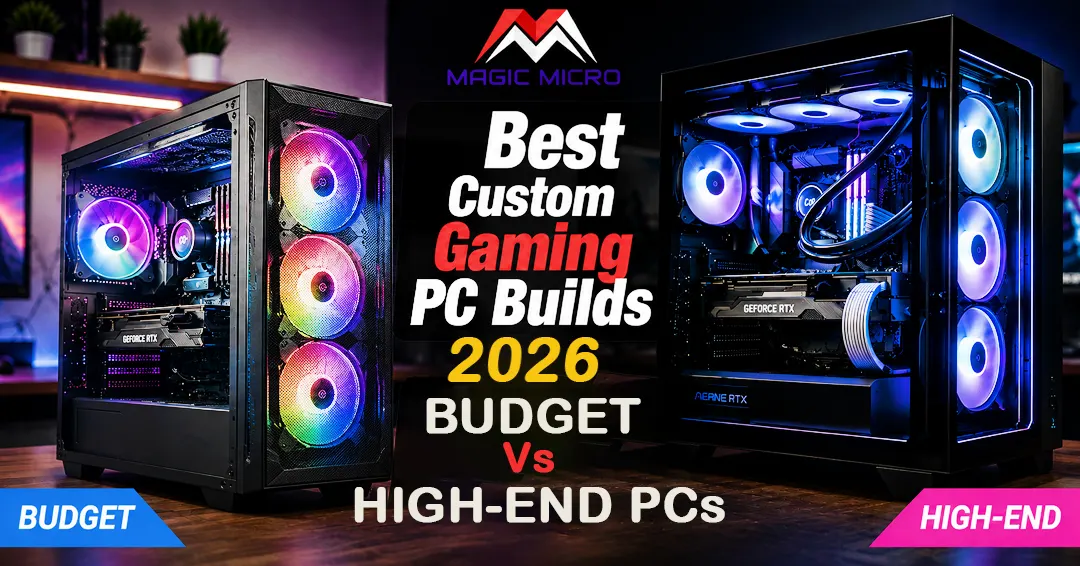
The Budget Build: $800 to $1,100
Who this is for: Anyone gaming at 1080p or entry-level 1440p who wants smooth, consistent performance without overpaying.
Graphics Card
Go with an RTX 5060 Ti or RX 8700 XT. Both sit around $350 to $430 in the market right now. At 1080p on high settings, these cards push 100 to 144 frames per second in every major game released this year. At 1440p medium settings, they stay above 60 FPS without trouble. That covers the vast majority of gamers.
Processor
A 6-core CPU is all you need here. The Ryzen 5 7600X and Core i5-14600K both do the job well. They boost past 5.0 GHz, handle every current game without slowing the GPU down & stay cool with basic air cooling. No need for anything fancier at this tier.
Memory
Get 16 GB of DDR5 RAM as two sticks – not one. Running two sticks instead of one (called dual channel) makes a real difference in how smooth the system feels. If your PC also doubles as a work machine, stretch to 32 GB. The price gap between 16 and 32 GB is small enough that it usually makes sense.
Storage
A 1 TB PCIe Gen 4 NVMe drive covers most people fine. The Samsung 980 Pro and WD Black SN850X are both solid options. Gen 4 also keeps you ready for Microsoft DirectStorage, which more games are starting to use for faster loading.
Cooling and Power
A good air cooler – something like the Thermalright Peerless Assassin – keeps the CPU running comfortably without needing a liquid cooler. For power, a 650W 80+ Gold unit covers the whole system with room to spare.
What This Build Cannot Do
It will not handle 4K gaming or path tracing at high frame rates. That is fine – it is not built for that. Match the hardware to your monitor, not the other way around.
The High-End Build: $2,500 to $3,500
Who this is for: Anyone with a 4K monitor, a high refresh rate display, or someone who just wants the best experience available right now and plans to keep the machine for five or more years.
Graphics Card
At 4K, you need an RTX 5080 at a minimum. The reason is VRAM – several big 2026 releases are already pushing past 12 GB of video memory at maximum settings. The RTX 5080 comes with 16 GB of fast GDDR7 memory. The RTX 5090 doubles that at 32 GB and is the card to get if you want zero compromises. Ray tracing and path tracing at 4K are genuinely demanding & DLSS 4 with Multi Frame Generation helps a lot – but you still need the VRAM headroom underneath it all.
Processor
The Ryzen 7 9800X3D is the best gaming CPU money can buy right now. Its 3D V-Cache design keeps game data close to the processor, which cuts down on stutters during fast-moving open world games. If you prefer Intel, the Core Ultra 9 285K is competitive – slightly better at multi-threaded work, slightly behind in pure gaming.
Memory
32 GB of DDR5 running at 6000 MHz. The 9800X3D is sensitive to memory speed, so slower RAM genuinely holds it back. Make sure XMP or EXPO is turned on in your BIOS settings after the build – otherwise, the system defaults to 4800 MHz & you leave real performance on the table.
Storage
Go with 2 TB here. At this tier, storage should never be a limiting factor. Big games in 2026 regularly install at 80 to 130 GB each & constantly uninstalling games to make space gets old fast.
Cooling and Power
A 360mm liquid cooler keeps the 9800X3D running at its best through long gaming sessions. For power, use a 1000W 80+ Gold unit. The RTX 5090 alone draws close to 575W under load. Running an 850W PSU at that level puts it near its limit, which is not where you want to be on a $3,000+ machine.
So Which One Should You Actually Build?
Here is the honest version:
- Gaming at 1080p on a 144Hz monitor – Budget build, no question. Put the money you save toward a better monitor.
- Gaming at 1440p on 144 to 165Hz – Mid-range build around $1,200 to $1,800. Not covered in full detail here, but sits between these two tiers.
- Gaming at 4K on 60Hz – High-end GPU, mid-range CPU. You do not need the 9800X3D for 60 FPS gaming.
- 4K at 120Hz or higher with path tracing on – Full high-end build. No shortcuts work here.
The most common mistake people make is building for a monitor they do not own yet. Buy for the display sitting on your desk today. Upgrade the monitor first, then match the PC to it.
Working with a top custom PC building company that specs hardware around your actual monitor and use case – rather than chasing impressive numbers on a spec sheet – makes a bigger difference than most people expect before they experience it.
Both build tiers are available through Magic Micro’s gaming PC catalog, fully customizable to match your display and budget. If you want a build put together around your specific setup rather than a fixed configuration, the build team handles that directly.
Frequently Asked Questions
1. What is the best gaming PC build for 2026?
Choose a build based on your monitor resolution, gaming needs, and budget.
2. Is a budget gaming PC good for modern games?
Yes, the budget builds easily handle 1080p and entry-level 1440p gaming.
3. How much should I spend on a gaming PC?
Budget builds start around $800, while high-end builds range from $2,500 and above.
4. Which GPU is best for 4K gaming?
The RTX 5080 and RTX 5090 are excellent choices for 4K gaming.
5. Is 16GB RAM enough for gaming?
Yes, but 32GB is better for multitasking and future-proofing.
6. Should I choose AMD or Intel?
Both offer excellent gaming performance; choose based on your needs and budget.
7. Why use DDR5 memory?
DDR5 delivers faster speeds and improved gaming performance.
8. Is an NVMe SSD worth it?
Yes, it provides faster boot times and quicker game loading.
9. What PSU is recommended?
Use a quality 650W PSU for budget builds and 1000W for high-end systems.
10. Why choose Magic Micro?
Magic Micro offers premium custom gaming PCs and workstations built to match your budget and gaming goals.