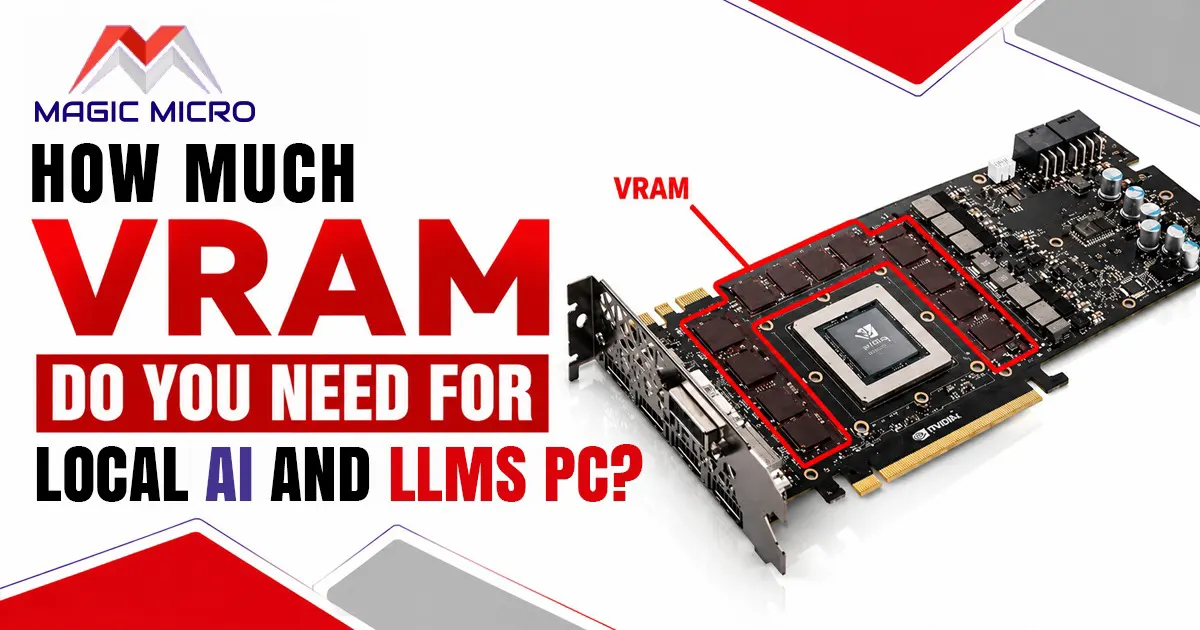
If you have ever tried running a language model on your own PC, you may have discovered something frustrating: the model looks compatible with your hardware, but it still refuses to load because the graphics card does not have enough VRAM.
That is why VRAM deserves serious attention when building custom-built PCs for local AI and LLM workloads.
The amount you need depends on the model size, quantization, context length, and what else you plan to run on the GPU. NVIDIA also recommends considering the model size and workflow when choosing hardware for local AI. NVIDIA’s local AI hardware guide is a useful reference for understanding how GPU memory relates to different workloads.
Why VRAM Matters for Local LLMs?
When you run an LLM locally, the model’s weights have to be loaded into memory. The larger the model, the more memory it generally needs.
For example, a 7-billion-parameter model is much easier to run on a consumer graphics card than a 30-billion- or 70-billion-parameter model. Quantization can reduce the amount of memory required, but you still need enough room for the model, context & other workloads.
Hugging Face’s documentation notes that 8-bit quantization can roughly halve memory usage, while 4-bit quantization reduces it further.
That is why simply buying the fastest GPU is not always the right approach.
8GB VRAM: Entry Level
An 8GB graphics card can be useful for experimenting with smaller local models, especially when using efficient quantization.
It is also enough for many normal gaming workloads. For example, Magic Micro currently offers gaming configurations with 8GB graphics cards, making this capacity reasonable when gaming is the primary purpose.
For local LLM use, however, 8GB gives you less room to experiment. Larger models, longer context windows & more demanding workloads can quickly push against the limit.
Best for:
- Small local models
- Basic experimentation
- Gaming plus occasional local model use
- Lightweight development
If local AI is going to become a major part of your workload, I would not choose 8GB simply because it saves money.
12GB-16GB: The Practical Sweet Spot
For many enthusiasts, 12GB or 16GB is where local model experimentation becomes considerably more comfortable.
You have more flexibility with quantized 7B and similar-sized models, while 16GB gives you additional breathing room for larger models and longer contexts.
This is also where choosing the right graphics card becomes important. A card with slightly less raw speed but more VRAM can sometimes be the better choice for local model work.
Magic Micro’s catalog includes configurations with 16GB graphics cards, including systems using the Radeon RX 9070 XT and RTX 4080.
Best for:
- Regular local LLM use
- 7B-class models
- Quantized models
- Development and testing
- Gaming and productivity combined
For someone who wants one PC that can handle gaming and local model experimentation, 16GB is a sensible target.
24GB VRAM: When Things Get Serious
Once you start working with larger models, 24GB becomes much more attractive.
The extra memory gives you more flexibility with model size, context length & other GPU workloads. It also means you are less likely to spend your time trying to squeeze a model into a card that is already at its limit.
This is particularly important if you plan to experiment with different models rather than sticking with one small configuration.
For a dedicated local AI workstation, I would generally look toward 24GB or more if the budget allows.
What About 32GB, 48GB or More?
This is where workstation hardware starts making more sense.
Large models, model fine-tuning, bigger context windows, image-generation workloads & other GPU-heavy tasks can consume considerably more memory.
At this level, the question changes from “Can I run this model?” to “How large a model can I run comfortably & how much headroom do I want?”
Magic Micro offers professional workstations that can be configured around demanding workloads rather than forcing you into a fixed specification. Magic Micro Professional Workstations
For serious local development, workstation-class hardware can also make sense when you need substantial system RAM alongside high-VRAM graphics hardware.
VRAM Isn’t the Only Specification That Matters
It is easy to become obsessed with VRAM, but it is only one part of the system.
You also need to consider:
- GPU compute performance
- System RAM
- CPU performance
- NVMe storage
- Cooling
- Power supply capacity
- Model quantization
- Context length
- Whether you are running one model or several
A machine with 24GB of VRAM and insufficient system memory can still become frustrating to use.
For larger local workloads, I would rather build a balanced machine than spend the entire budget on the graphics card.
How Much VRAM Should You Buy?
A simple way to look at it is:
- 8GB VRAM – Best for small local models, basic experimentation & lightweight AI workloads.
- 12GB VRAM – Suitable for entry-level local LLM workloads and smaller quantized models.
- 16GB VRAM – A strong all-around choice for running local LLMs, development, testing & mixed gaming/productivity use.
- 24GB VRAM – Recommended for larger models, longer context windows & more demanding local AI workloads.
- 32GB+ VRAM – Better suited for heavy AI workloads, larger models, model development & professional workstation use.
These are practical guidelines rather than hard limits. Quantization can significantly change what fits into a particular card & actual memory requirements vary by model and workload. But if you’re unsure how much system memory you actually need, Magic Micro’s guide on how much RAM gaming PCs really need provides a useful breakdown of different RAM capacities and workloads.
Should You Build a PC Specifically for Local LLMs?
If you already own a gaming PC, there is no reason not to start there. Try smaller models, see how much memory they consume & determine what you actually want to run.
If you are buying a new system, though, think beyond today’s requirements.
This is where custom gaming PCs and workstations can be useful. Instead of choosing a computer based only on gaming benchmarks, you can balance the GPU, CPU, RAM, storage, cooling & power supply around your actual workload.
Magic Micro builds fully configurable systems, so a gaming-focused machine can be configured differently from a workstation intended for demanding professional workloads. Magic Micro Custom PC Catalog
Final Takeaway
For occasional local LLM experimentation, 8GB can get you started, but it is restrictive. 16GB is a much more comfortable target for a mixed-use PC, while 24GB or more becomes increasingly valuable for larger models and serious local workloads.
The biggest lesson is simple: don’t buy a GPU based only on its speed. If local LLMs are part of your plans, VRAM capacity should be one of the first specifications you check.
A balanced PC with enough VRAM will usually give you a much better experience than an extremely fast GPU that runs out of memory before your model even loads.
Frequently Asked Questions
1. How much VRAM do I need for local LLMs?
16GB is a good starting point for many users. Smaller models can work with 8GB, while larger models may need 24GB or more.
2. Is 8GB VRAM enough for local AI?
Yes, for smaller models and basic experimentation. However, 8GB can become limiting with larger models.
3. Is 16GB VRAM good for LLMs?
Yes. 16GB offers a good balance for local LLMs, gaming, development, and other demanding tasks.
4. Is 24GB VRAM enough for large LLMs?
24GB provides much more room for larger models and longer context sizes, especially when using quantized models.
5. Is more VRAM always better?
Not necessarily. More VRAM helps with larger workloads, but GPU speed, CPU, RAM, and storage also affect overall performance.
6. Does RAM matter when running local LLMs?
Yes. System RAM is important for loading models, running applications, and handling tasks that don’t fit entirely into VRAM.
7. What is the difference between VRAM and RAM?
VRAM is the memory used by your graphics card, while RAM is the main memory used by your computer and its applications.
8. Can I run an LLM with a gaming GPU?
Yes. Many gaming GPUs can run local LLMs, provided they have enough VRAM for the model you want to use.
9. Does quantization reduce VRAM requirements?
Yes. Quantization can reduce the memory needed to load a model, allowing some larger models to run on GPUs with less VRAM.
10. What other hardware matters besides VRAM?
CPU performance, system RAM, storage, GPU performance, cooling, and the power supply all contribute to a good local AI setup.